Before you write a single word, ask one question: what does the reader want? This is called search intent. Google wants to show pages that solve the searcher’s problem quickly.
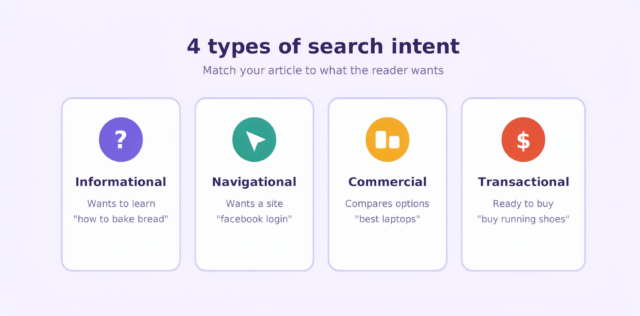
There are four main types of intent:
- Informational: The person wants to learn something, like “how to bake bread.”
- Navigational: The person wants a specific site, like “Facebook login.”
- Commercial: The person is comparing options, like “best laptops under $500.”
- Transactional: The person is ready to buy or sign up.
Search your topic on Google first. Look at the top results and notice what type of content ranks. If the top pages are step-by-step guides, write a guide. If they are lists, write a list. Matching intent is the fastest way to improve your chances.
Keywords are the words people type into Google. Without them, your article may never reach the right audience.
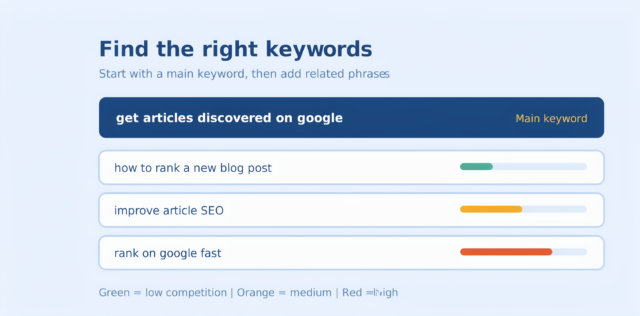
Begin with a main keyword, such as get articles discovered on Google. Then add related phrases, like rank on Google or improve article SEO. Free tools such as Google Search Console, Google Trends, and Google’s People also ask box can help you find these ideas.
Also, choose long-tail keywords when you are new. These are longer phrases with less competition. For example, how to rank a new blog post” is easier to win than SEO.
Here is the truth: no trick beats useful content. Google’s systems are built to reward pages that are helpful, original, and written for people.
To make your article stand out, try these habits:
- Answer the main question early. Do not make readers scroll for the answer.
- Use simple words. Short sentences are easier to read and understand.
- Add real examples. Stories, data, and screenshots build trust.
- Share your experience. Google values first-hand knowledge.
- Update old posts. Fresh facts keep your content relevant.
Moreover, aim for depth. A detailed article that covers a topic fully usually performs better than a thin one. However, do not add fluff just to reach a word count. Every paragraph should earn its place.
Use Headings and Clear Structure
Many readers skim before they commit. So, make your article easy to scan.
- Use one H1 for the main title.
- Then use H2 and H3 headings to break the content into sections.
- Keep paragraphs short, ideally two to four lines. Add bullet points and numbered lists where they fit.
- This structure helps readers, and it also helps Google understand your page.
Optimize Your On-Page SEO
On-page SEO means the small details inside your article. They may look minor, but together they matter a lot.
- Keyword placement: Use your main keyword in the title, the H1, the first 100 words, and the URL.
- Short URLs: A clean URL like /get-articles-discovered-on-google is better than a long, messy one.
- Image alt text: Describe each image in a few words. This helps search engines and screen readers.
- Internal links: Link to your other related articles. This helps Google find more of your pages.
- External links: Link to trusted sources to support your claims.
Be careful not to stuff keywords. Write naturally. If a sentence sounds strange when you read it aloud, rewrite it.
Make Your Site Fast and Mobile-Friendly
Most people search on their phones. If your page loads slowly or looks broken on a small screen, visitors will leave quickly. That tells Google your page is not helpful.
To fix this, compress your images, use a reliable hosting service, and choose a responsive theme. You can test your speed with Google PageSpeed Insights. Also, check your Core Web Vitals report in Search Console. A fast, smooth site gives your article a better chance to rank.
Help Google Find and Index Your Article
Google cannot rank what it has not found. So, make sure your page is easy to discover.
First, set up Google Search Console. It is free and shows how Google sees your site. Next, submit your XML sitemap, which is a list of all your pages. After publishing a new article, use the URL Inspection tool and click “Request Indexing.” This can speed up the process.
In addition, make sure your page is not blocked by a “noindex” tag or your robots.txt file. Sometimes a simple setting is the reason an article never appears.
Build Backlinks and Authority
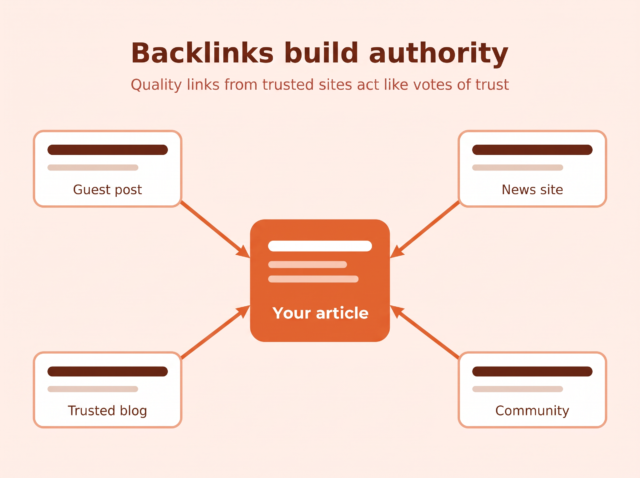
Backlinks are links from other websites to yours. Google treats them like votes of trust. The more quality sites that link to you, the more authority you gain.
You do not need shady tactics. Instead, try these safe methods:
- Write guest posts for respected blogs in your field.
- Share original research or helpful tools that others want to cite.
- Reach out to people who mentioned your topic.
- Join online communities and share your work where it is allowed.
Quality matters more than quantity. One link from a trusted site is worth more than dozens from weak ones.
Promote Your Article After Publishing
Do not wait for Google to do all the work. Share your article on social media, in newsletters, and in relevant groups. Although social shares are not a direct ranking factor, they bring early visitors. Those visitors can lead to more links, mentions, and engagement.
Be Patient and Track Your Results
SEO is not instant. A new article can take weeks or even months to rank. Meanwhile, keep checking Search Console to see which queries bring impressions and clicks. If an article gets views but few clicks, improve the title. If it gets clicks but people leave fast, improve the content.
Getting your articles discovered on Google comes down to a few clear steps. Understand what your reader wants, choose the right keywords, and write helpful content in simple language. Then polish your titles, headings, and links, and keep your site fast. Finally, help Google index your page and promote it to real people.
Start small. Pick one article today, apply these tips, and track the results. With steady effort, your content will climb the rankings and reach the readers who need it.